IPTV Smarters Pro – Best Online Video Player
What is an IPTV Smarters Pro?
IPTV Smarters Pro is a powerful and versatile online video player that delivers a smooth and high-quality viewing experience across multiple platforms. Designed for seamless usability, it supports a wide range of formats, including M3U and JSON playlists, enabling users to play their personally owned media from both local storage and remote sources. Whether for live streaming, video-on-demand, or audio playback, media players like IPTV Smarters Pro provide a reliable, high-performance media experience without interruptions.
Following is a comprehensive list of the devices supported by IPTV Smarters Pro.

Android
Best video player for Android Devices
Android phones, Android TV, Android TV boxes, Android Fire TV sticks, Nvidia Shields, and other Android sticks or devices.

Windows/macOS
Best web player for PCs
Windows 8/10 and all versions of macOS, including the latest versions.

iOS Devices
Best ott player for iOS devices
IPTV Smarters ProNow available with the name “Smarters Player Lite” on App Stores and supports iPhone, iPad and Apple TV (tvOS).

Smart TVs
Best Media Player for Smart TVs
Smart TVs like LG & Samsung (App available in the store to download).
Features Overview


Download IPTV Smarters Pro


iOS App
Download Latest Version (v1.1.3)
(Smarters Player Lite)


MacOS App
Download Latest Version (v1.1.2)


Windows App
Download Latest Version (v1.1.2)


Web Browser Player
Download Latest Version (v2.0)


Smart TV App
Download Latest Version (v1.0.4)


Downloads (Old Version V4.0.2)
Download URL: https://www.smartersott.app/smarters-4.0.2.apk


Downloads (Old Version V4.0.1)
https://www.smartersott.app/smarters-4.0.1.apk
Download URL: https://www.smartersott.app/smarters-4.0.1.apk
Downloads (Old Version V4)
https://www.smartersott.app/smarters4-0.apk
Download URL: https://www.smartersott.app/smarters4-0.apk
Download URL: https://www.smartersott.app/smarters4-0.apk
Downloads (Old Version V3)
https://www.smartersott.app/smarters.apk
Download URL: https://www.smartersott.app/smarters.apk
Premium Version – IPTV Smarters Pro
Unlock all the premium features:
Note: For iOS :You have to download the Application from the apple store and buy premium from in-app purchase
For Smart TV : It’s
free IPTV Player for end-users.
Frequently asked questions
01 What is an IPTV Smarters Pro ?
Key Features of IPTV Smarters Pro
1. User-Friendly Interface : IPTV Smarters Pro is known for its intuitive and easy-to-navigate interface, which makes it simple for users to find and stream their desired content.
2. Support for Multiple IPTV Formats : It supports various IPTV formats such as M3U, M3U8, and XSPF, allowing users to import playlists from different IPTV service providers.
3. Electronic Program Guide (EPG) : The app includes EPG support, which provides a schedule of upcoming TV programs, helping users to plan their viewing.
4. Multi-Screen Viewing : IPTV Smarters Pro allows users to stream different channels on multiple devices simultaneously, making it a good option for households with multiple viewers.
5. Video on Demand (VOD) : Users can access VOD content, including movies and TV shows, allowing them to watch what they want, when they want.
6. Catch-Up TV : The app offers catch-up TV functionality, so users can watch programs that they missed.
7.Parental Controls : Built-in parental controls enable parents to restrict access to certain channels and content, ensuring a safe viewing experience for children.
8. External Player Integration : It supports integration with external media players, giving users flexibility in their viewing options.
9. User Account Management : IPTV Smarters Pro supports multiple user profiles, making it suitable for families or shared households.
10. Compatibility : The app is compatible with a wide range of devices, including Android and iOS smartphones and tablets, Windows and Mac computers, and even some Smart TVs and streaming devices.
How to Use IPTV Smarters Pro
1.Download and Install : Install IPTV Smarters Pro from your device’s app store (Google Play Store, Apple App Store, etc.).
2. Set Up : Open the app and log in using the credentials provided by your IPTV service provider. This typically includes a username, password, and a server URL.
3.Import Playlist : Import your IPTV playlist (M3U, M3U8, etc.) provided by your IPTV service provider.
4. Browse and Stream : Navigate through the interface to browse live TV channels, VOD content, and catch-up TV options. Select the content you want to watch and start streaming.
Legal Considerations
While IPTV Smarters Pro itself is a legitimate app, the legality of the content you access through it depends on your IPTV service provider. Always ensure that you are using a legal and authorized IPTV service to avoid potential legal issues.
If you have any more specific questions or need further assistance with IPTV Smarters Pro, feel free to ask!
02 Does IPTV Smarters Pro contain the playlist/content to watch?
It plays the m3u8 playlist, content from the web URL, and Local audio/ video files.
FRAUD AWARENESS
- This is a disclaimer to inform our users that a few websites are illegally duplicating our official website, using our name and site content, and selling subscriptions and packages. Please note that we do not endorse or have any affiliation with these websites, and any transactions made with them will not be honored by us.
- To ensure that you are using a legitimate website, please ensure that the URL begins with “https://www.iptvsmarters.com/,” and we don’t sell any IPTV subscriptions or Channel Packages. Also, you have verified the website’s authenticity through other means, such as checking for a secure SSL certificate and contacting our customer support for confirmation.
- We take the protection of our customers and brand very seriously and are taking steps to shut down these fraudulent websites. If you find any other website, you suspect is fake. Please report it to us immediately.

NEW VIDEO PLAYER RELEASED OUT
Checkout
Smarters Pro
Compatible with Android TV, iPhone, iPad, Apple TV and Web Browsers

Terms & Conditions
LICENSE AGREEMENT
YOU HEREBY AGREE TO TERMS HERE OTHERWISE DO NOT USE THE APP.
IPTV Smarters Pro is an advanced player that uses M3U and JSON user-added playlists.
We do not provide any actual playlists or contents.
This application is designed to use with the user’s own or added playlist with legal contents.
You are responsible to check your added playlists/contents are legal and you have full rights to use and/or RECORD contents.
We are not responsible for misuse of copyright or third party contents using our software and please check your contents are legal and/or you have rights to use and/or RECORD.
By using our application means you accept the above terms and conditions
Disclaimer

Users must provide their own contents
We strictly do not endorse the streaming of copyright-protected material without permission of the copyright holder
IPTV Smarters is an incredible video streaming player which is developed especially for end-users that want to be provided with the facility to watch live TV, VOD, Series and TV Catchup on their Smart TV. This video player app is easy to use and yet highly efficient with a powerful player, attractive and very impressive layout and most importantly user-friendly.
Installation Guide
Step 1: Access the Source
Press the Source button on your Samsung remote to get started.
Step 2: Download IPTV Smarters Pro
Navigate to Search and type in IPTV Smarters Pro to download the app.
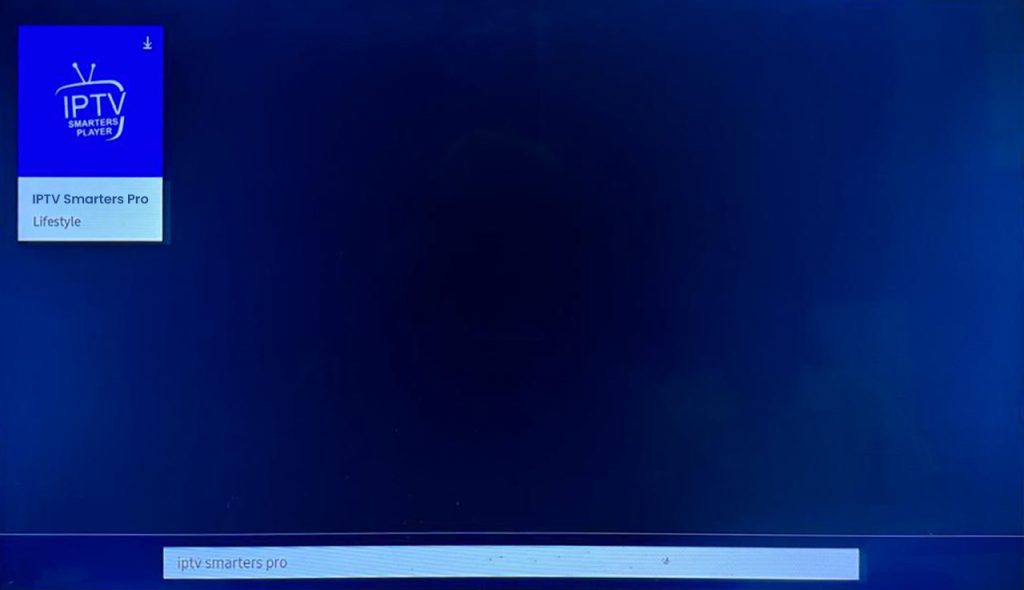
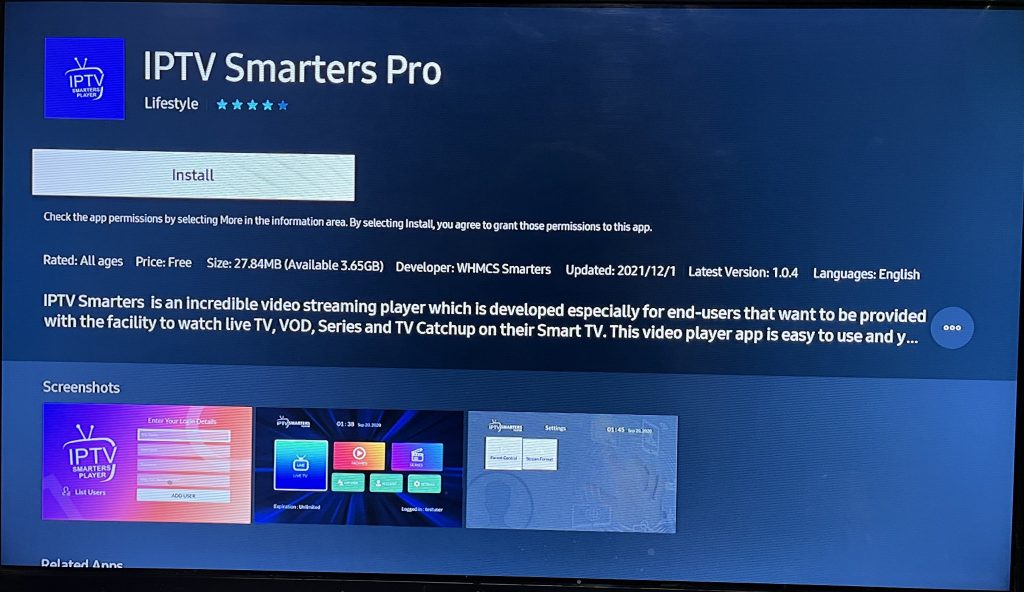
Step 3: Log In to the App
Open the application and log in using your subscription details: Username, Password, and Portal URL.
Important Note:
Ensure that your service provider has their DNS registered with us for optimal performance. More Info
Please be aware: The Premium Version features are not available for Samsung Smart TVs.
IPTV Smarters is an incredible video streaming player which is developed especially for end-users that want to be provided with the facility to watch live TV, VOD, Series and TV Catchup on their Smart TV. This video player app is easy to use and yet highly efficient with a powerful player, attractive and very impressive layout and most importantly user-friendly.
Installation Guide
Step 1: Access the Home Menu
Press the Home button on your LG remote to begin.
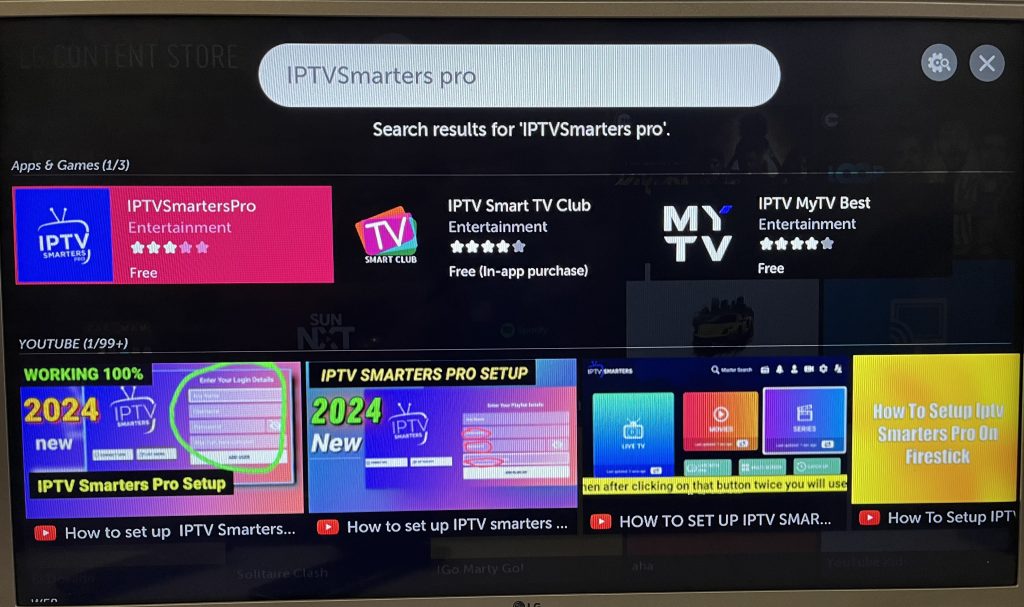
Step 2: Open the LG Content Store
Navigate to the LG Content Store and open it.
Step 3: Download IPTV Smarters Pro
Select the Search button and type in IPTV Smarters Pro to download the app.
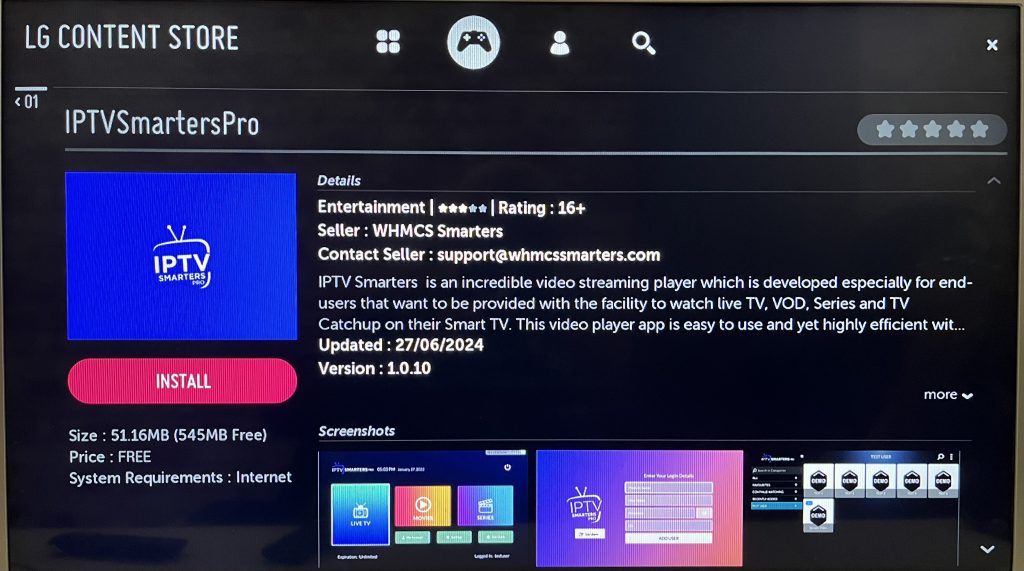
Step 4: Log In to the Application
Open the application and log in using your subscription details: Username, Password, and Portal URL.
Important Note:
Please ensure that your service provider has their DNS registered with us for optimal performance.More Info
Note: Premium version features are not available for LG Smart TVs.